DAS Trader Pro feature highlight part 11
Load a web page with the symbol from the montage
Did you know that you can get the current montage symbol opened on any website having the same symbol in URL?

For example:
https://finviz.com/quote.ashx?t=AAPL&ty=c&p=d&b=1
https://finance.yahoo.com/quote/AAPL
https://www.benzinga.com/quote/AAPL
When implemented, it can look like this
Sponsor block
Open an account with Guardian Trading through this link to get
2 months free DAS Trader Pro with API access ($500 value)
$0.0009 per share commissions
30% discount on locate fees
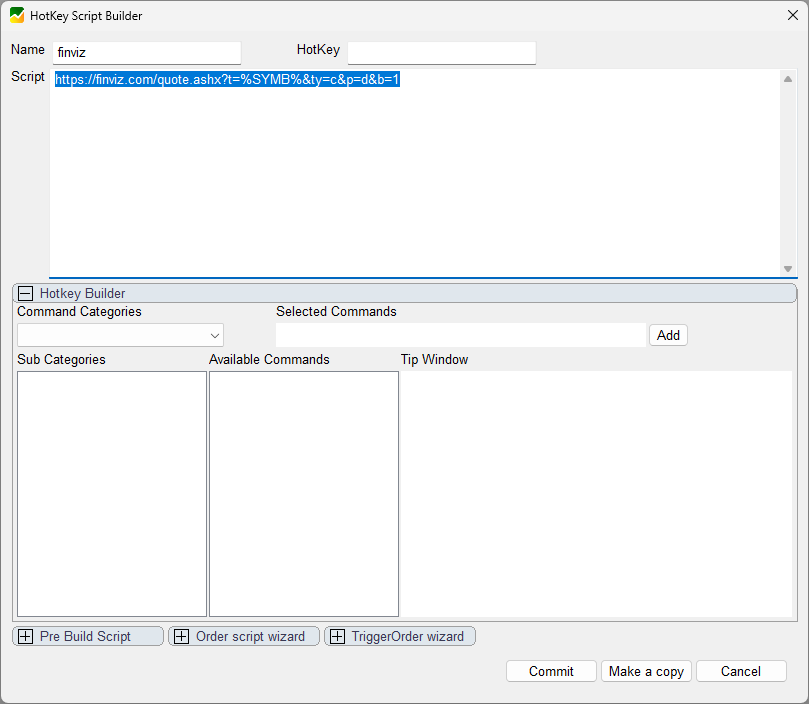
All that is needed is to create a simple hotkey like this
https://finviz.com/quote.ashx?t=%SYMB%&ty=c&p=d&b=1and let it run on symbol change just once as described here, or you call it manually as needed.
The magic happens on the %SYMB% so you just replace the symbol ticker with %SYMB% in your URL
https://www.benzinga.com/quote/%SYMB%The disadvantage is that it always opens a new tab, so if you go through many symbols, be prepared to have your browser clogged with tabs.